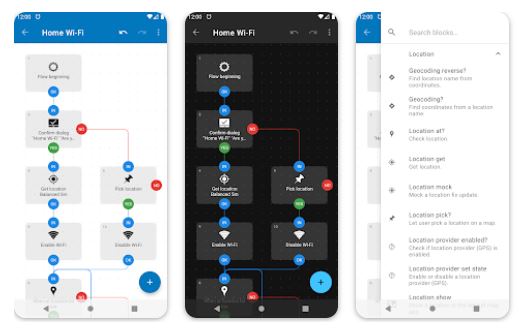
You’ll find several Android apps that promise powerful automation options, but they’re not always so user-friendly. For something a bit more approachable, consider Automate, which uses a visual, flowchart-based interface for making your own custom-designed scripts. This innovative approach not only simplifies the automation process but also makes it engaging, allowing users to see their ideas take shape visually.
320 Different Task Building Blocks
This top Android app boasts more than 320 different task building blocks that can include actions, event triggers, loops, and more; you can arrange those blocks in a flowchart style to easily visualize your creations. Whether you’re a tech novice or a seasoned programmer, Automate offers a welcoming environment for all skill levels. It is free to use, with a $2.99 in-app purchase unlocking a Premium mode for creating scripts that require more than 30 blocks, thus catering to both casual users and those looking for more extensive automation capabilities.
Automation Made Easy
Imagine having Android device automation made easy, where Automate can seamlessly perform your daily routine automatically. With its versatile features, it can manage files on your device and remote storage, ensuring that your important documents are always organized and accessible. Moreover, it can back up apps and files, providing peace of mind that your data is safe from loss.
Control Phone Calls
The app also supports sending and receiving messages, whether through SMS or popular messaging platforms, allowing you to stay connected without lifting a finger. You can control phone calls with the touch of a block, silencing your phone during meetings or automatically answering calls when driving. Additionally, Automate can access online content, keeping you updated with the latest news or weather information without needing to open a browser.
Powerful Assistant
With its capabilities to take pictures, record audio and video, and configure device settings, Automate transforms your smartphone into a powerful assistant. It can integrate with other apps, allowing for a seamless workflow that enhances productivity. You can even start tasks manually or set them to trigger based on a schedule, when reaching a specific location, or when starting a physical activity, ensuring that your automation fits seamlessly into your lifestyle.
The beauty of Automate lies in its simplicity and power. You can create your automated tasks by drawing flowcharts, where you simply add and connect blocks. For novices, the app provides predefined options, making it easy to get started, while experienced users can dive deeper into the world of automation by using expressions, variables, and functions to create more complex scripts.
Library of Options
All-inclusive, Automate leaves little to be desired. Almost every feature on your Android smartphone or tablet can be controlled using the more than 410 building blocks included in the app. This extensive library of options means that your automation possibilities are virtually limitless, allowing you to tailor your experience to meet your specific needs and preferences.
Furthermore, sharing your work with others is a breeze. You can save time by downloading complete automation “flows” that other users have already made and shared through the in-app community section. This not only fosters a sense of collaboration but also provides an opportunity to learn from others and discover new ways to utilize the app’s features.
Additionally, Automate is context-aware, meaning it can perform recurring tasks based on various conditions such as the time of day, your location,physical activity levels, heart rate, steps taken, events in your calendar, the app currently open, connected Wi-Fi network, remaining battery, and hundreds of other conditions and triggers. This ensures that your automation is not just reactive but also adaptive, responding intelligently to your changing environment.
Summary
In a world where efficiency is key, Automate stands out as a user-friendly solution that empowers everyone, from busy professionals to tech enthusiasts, to harness the full potential of their Android devices and streamline their daily routines with ease.